

The problem of speeding contributes significantly to road accidents. This is more noticeable where there are school zones, residential areas, and areas with many pedestrians. Traditional signs provide information about the maximum speed but cannot provide drivers with the current speed at which they are driving. The Radar Speed Sign with Driver Feedback provides this solution by measuring the incoming speed of the vehicle and providing real-time speed information. Such devices help drivers to check their speed and adjust if necessary before entering the potential hazard zones.
1. Quick Learn — Radar Speed Sign with Driver Feedback
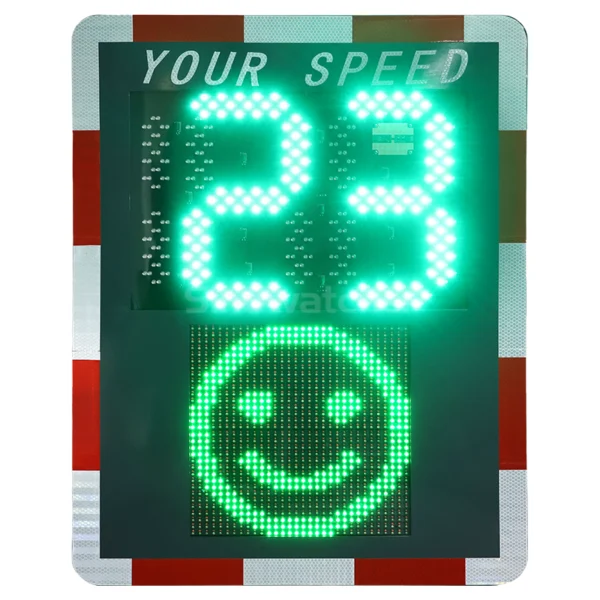
The Radar Speed Sign with Driver Feedback is a traffic safety device that employs radar technology to provide speed measurement and information using an LED sign. Different configurations may provide additional means of information, such as different colors, flashing, or even data logging.
How Does It Detect and Display Vehicle Speed?
The operating process involves three main steps:
- Speed measurement: The radar transmitter sends out electromagnetic waves and determines the change in the frequency of the received signals to calculate the speed of a moving vehicle.
- Data processing: The controller inside the device measures the data and compares it to the predetermined speed threshold.
- Visible feedback: The LED panel shows the speed measurement result and may indicate the violation by turning into a blinking mode when a car goes over the threshold.
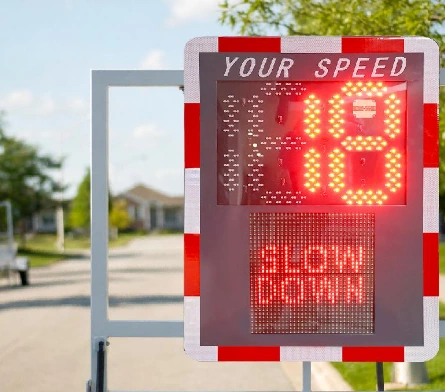
As an illustration, for a highway with a 25 mph speed limit, a car driving at 32 mph can set off the red signal or the flashing mode of the device, depending on how it has been programmed. This helps to provide the drivers with instantaneous and clear signals while there is still a chance to reduce the speed.
2. What Are the Main Benefits of a Radar Speed Sign with Driver Feedback?
Encourages Drivers to Reduce Speed
One advantage of a Radar Speed Sign with Driver Feedback is that it draws attention to speeding behavior. Drivers tend to not pay continuous attention to the speedometer, especially in case of roads they know. Showing the exact speed of the car acts as a reminder of their current speed. The visual signal may further motivate drivers to reduce speed in case of exceeding the posted speed limit. However, its success depends on the visibility, placement, and other factors.
Improves Safety in High-Risk Areas
Reduced vehicle speeds may increase driver response time in the presence of pedestrians, cyclists, and unforeseen road conditions. This becomes particularly important close to schools, residential streets, pedestrian crossings, and work sites. A Radar Speed Sign with Driver Feedback may be put up before the risky area, where motorists will get a speed warning as they approach it. The Traffic Manager needs to evaluate road geometry, sight distance, pedestrian traffic, and prevailing speed to identify the best placement for such signs. Typical use cases include:
- School zones: Provide speed reminders near children and school zones.
- Residential streets: Solve problems with persistent speeding on streets that are used by pedestrians, cyclists, and motorists.
- Work zones: Remind motorists to drive more slowly around construction workers and changing traffic conditions.
- Pedestrian crossings: Encourage motorists to drive slowly at crossing points.
Provides Real-Time Speed Awareness
A Radar Speed Sign with Driver Feedback allows drivers to see their current speed as they approach the sign. Thus, drivers will be able to know how fast they are going compared to the speed limit. The readability of the device will be enhanced through clear and bright LED numbers, as well as proper installation, to ensure that drivers have a chance of viewing the speed feedback before getting to the monitored spot.
For roads where drivers may overlook speed limits or struggle to recognize when they are speeding, the Sinowatcher’ s Radar Speed Sign with Driver Feedback is a suitable choice. Its red-and-green LED display provides visual feedback based on configured speed thresholds, helping drivers quickly recognize their speed status and respond accordingly.
Supports Traffic Data Collection and Analysis
Most of these devices come with features to gather traffic data. This could include vehicle numbers and the frequency of speeding. Such data will help traffic managers gauge the condition of the roads.
For instance, a pre-installation traffic test can be done to obtain a benchmark before installing the device and use that data to compare after installation. However, data collection capability differs between the various devices. Customers need to verify what kind of data is being collected, how data is exported, and any form of remote capability for data reporting.
Offers a Cost-Effective Traffic Safety Solution
Radar Speed Sign with Driver Feedback is an additional measure that can be used along with the traditional signs and other means for calming traffic without the necessity of constant supervision by traffic officials on site. The sign itself, once installed, can serve as many reminders during the day depending on the power source and operating conditions.
In addition to the price of the sign, the cost of installation, power consumption, maintenance, battery replacement, and data management must also be considered.
Solar versions of the sign will minimize the dependency on a wired power supply. The viability of such a solution will depend on the amount of sunlight, battery capacity, weather conditions, and power consumption of the sign.
3. How Do You Choose the Right Radar Speed Sign with Driver Feedback?
Evaluate Road Conditions and Traffic Volume
First, determine the use of the sign. A school zone will need clear speed limit indication, while the arterial road will require long-range detection and visible display. Consider the following criteria before choosing the model:
- Posted speed limit: The device should work within the desired range of speeds and alerts.
- Traffic: Consider the number of cars driving through the monitored zone.
- Road features: Pay attention to bends, slopes, approaches, and possible obstructions.
- Installation location: Sunlight, rain, heat, cold, and installation spots should be considered.
These features play a role in determining the appropriate screen size, radar capability, housing design, and installation method.
Compare Display, Detection, and Data Features
While choosing a Radar Speed Sign with Driver Feedback, buyers should compare the features of the device to their requirements and not choose a particular model for a single feature they need.
| Feature | What to Check |
| Detection range | Whether it provides sufficient advance warning |
| LED display | Digit size, visibility, colors, and warning modes |
| Speed settings | Configurable limits and alert thresholds |
| Data functions | Available traffic records and export options |
| Power supply | Mains, battery, or solar compatibility |
| Outdoor protection | Resistance to rain, dust, and temperature changes |
Check Customization and Technical Support
Various roads may need various screen layouts, speed requirements, installation methods, and power sources. It is important to check whether customization is available and technical support can be provided. While choosing a Radar Speed Sign with Driver Feedback, buyers should ask their supplier about the posted speed limit, traffic situation, detection distance, and power source of their site.
4. Conclusion
The Radar Speed Sign with Driver Feedback has various advantages, such as promoting drivers to slow down, enhancing safety at high-risk sites, offering instant feedback about drivers’ speeds, and helping collect traffic data. It increases awareness of speeding to allow the traffic manager to promote safer driving behaviors and make informed decisions on road safety policies.
Selecting a sign that suits the actual traffic environment and the project requirement will enable the authority to maximize its budget in the area of road safety. If you require any advice regarding your selection or configuration of the sign, feel free to contact Sinowatcher.
0