

Speeding has been noted to be one of the issues in road safety, especially in school zones, residential areas, and locations that experience high pedestrian activity. Conventional speed limit signs indicate to motorists what the legal speed limit is, but they do not indicate whether a motorist is going above the speed limit. A Radar Speed Sign with Driver Feedback helps to solve this problem as it detects the speed of approaching vehicles and displays this information instantaneously. A comprehension of how the sign works, where it should be placed, and the settings required can go a long way in ensuring its effective use.
1. Understanding a Radar Speed Sign with Driver Feedback
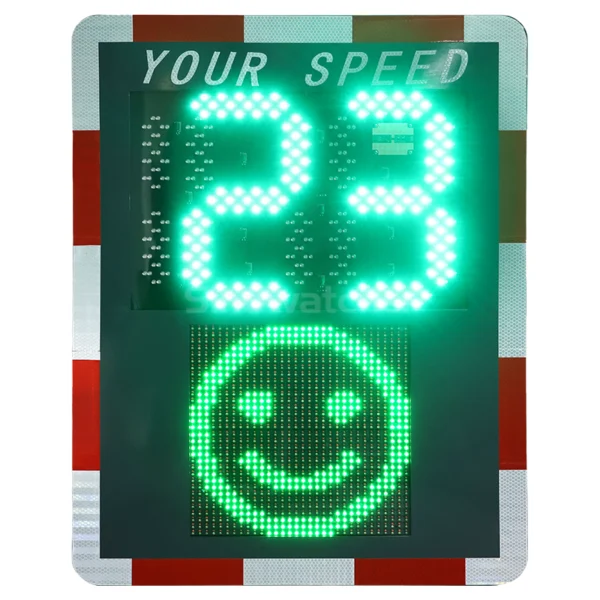
A Radar Speed Sign with Driver Feedback is a traffic safety electronic device used to measure vehicle speed and display the value on an LED screen. Design variations may include color-coded displays, flashing alerts, and even data collection capabilities that help reinforce drivers’ awareness of their speed.
The Purpose of Real-Time Speed Feedback
The main function of the gadget is to provide drivers with instant information regarding speed. In contrast to the speed limit provided through signs, drivers would get to know the exact speed of the vehicle as they approach a specific section of the road.
For instance, where the speed limit is 25 mph, a driver at 32 mph will receive information from the sign regarding the speed of the vehicle before reaching a particular crossing or entry point. The following are some of the objectives of a radar speed sign with driver feedback:
- Encourage drivers to recognize and correct speeding.
- Improve awareness of speed limits in sensitive areas.
- Provide traffic speed data when the equipment supports recording.
- Supplement existing road signs and other safety measures.
How It Differs from Traditional Speed Limit Signs
Traditional signage indicates the prescribed speed limit, while radar feedback signs react to the existing conditions of the traffic. They may alter their electronic message as the cars get closer, thus establishing more interactive relations with the drivers. Nevertheless, this kind of device cannot perform any automatic enforcement of speed limits, unless being combined with another, approved speed enforcement system.
2. What Is the Operating Process Behind a Radar Speed Sign with Driver Feedback?
The process of operation of a Radar Speed Sign with Driver Feedback generally involves three stages: speed measurement, data processing, and visual communication. Regardless of the design specifics, the mechanism is rather simple.
Detecting Vehicle Speed with Radar Technology
The sensor sends electromagnetic waves to approaching vehicles. The reflected wave experiences a frequency shift due to the Doppler effect. The radar analyzes this frequency alteration to calculate the vehicle speed. Several parameters, such as how the radar is constructed, its angle of installation, chosen targets, and manufacturing specifications, affect the quality of the measurement. To achieve good results, the installer needs to mount the radar according to the recommended height and alignment.
Processing Speed Data and Comparing It with the Speed Limit
Once the speed is measured by the device, the radar controller processes the signal received from the radar sensor and calculates the speed value for display. This speed value is compared to the chosen speed limit to determine if there is any need for visual feedback.
For instance, if the speed limit is set to 30 mph, the sign could show the vehicle speed continuously or only when the speed exceeds some programmed value. The Radar Speed Sign with Driver Feedback may behave in different ways at different speeds, according to the selected options and features of the device.
| Measured vehicle speed | Example display response |
| 25 mph in a 25 mph zone | Displays the current speed |
| 29 mph in a 25 mph zone | Displays the speed, potentially with a warning color |
| 35 mph in a 25 mph zone | Displays the speed and may activate a stronger visual alert |
Displaying Speed Readings to Drivers
After processing the speed value, the LED display displays the speed value to the driver. The use of high-contrast numbers will assist in easy readability, and proper display sizes and locations will aid in distant visibility.
For instance, a speed indicator with 28 mph will enable the driver to check if he is complying with the speed limit without having to comprehend any complex messages. The brightness of the display and viewing angle may influence readability.
Triggering Visual Alerts When Vehicles Exceed the Speed Limit
Some radar speed signs display visual warnings to inform drivers that they are exceeding the posted speed limit. This can be accomplished through a change in the display’s color, flashing of the numbers, or a warning sign. Visual alerts will allow drivers to know they are driving above the speed limit and make the necessary adjustments before driving through dangerous areas.
For road safety projects requiring real-time speed feedback, Sinowatcher’s Radar Speed Sign with Driver Feedback features a red-and-green LED display that uses green feedback for speeds within the configured limit and red with a warning icon when speeding is detected. Its standard detection distance is 100 m, with optional 150 m and 200 m ranges, making it suitable for applications such as school zones, road construction areas, and highway ramps.
3. How to Maximize the Effectiveness of Radar Speed Signs with Driver Feedback?
Selection of appropriate equipment is just one aspect of a successful traffic safety program; the placement, setup, and maintenance of equipment can affect the success of the Radar Speed Sign with Driver Feedback.
Selecting a Suitable Installation Location
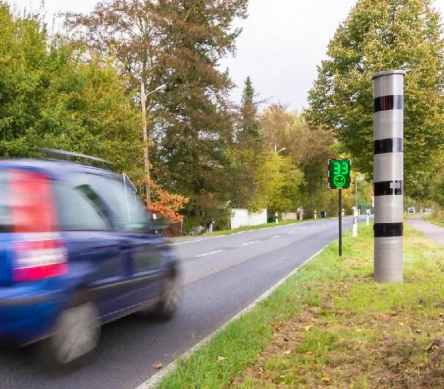
Placement of the sign must allow adequate time for drivers to recognize their speed from the display. Common installation locations include school zones, residential streets, crosswalks, construction zones, and areas with a history of repeated speeding. Before installation, traffic managers should assess:
- Approach speed: Consider the typical speeds of vehicles entering the monitored section.
- Visibility: Check sightlines, roadside obstructions, and display readability.
- Mounting and alignment: Follow the manufacturer’s requirements for installation angle and height.
- Environmental conditions: Consider rain, temperature, sunlight, and the need for weather-resistant housing.
Setting Appropriate Speed Thresholds
Speed limits and alert settings must conform to the purpose of the installation site. While one location may need a particular setting, others will not. For instance, if a speed limit sign is installed on a 20 mph speed zone, then the settings must be adjusted accordingly. It is important to ensure that administrators do not set confusing or dangerous thresholds for drivers.
Reviewing Traffic Data and Maintaining the Sign
Some signs record data like the number of vehicles, speeds, and speeding incidents. This information could be useful in assessing the effect of installing the sign by traffic managers. It might take a few weeks for managers to determine the effectiveness of such a tool, but at least they should have some indication of the change.
Maintenance should entail examining the display unit, verifying that all mounting parts are still intact, cleaning the sensor and screen according to recommendations, and ensuring that power supplies are working properly. In the case of solar energy units, it is also advisable to examine the panels and battery system from time to time. All data recorded by such devices should be handled in accordance with privacy policies.
4. Conclusion
The Radar Speed Sign with Driver Feedback involves using radar to determine vehicle speed, electronics for processing the collected data, and visual feedback. This device will be effective both due to the detection technologies used and proper installation location, visual feedback, settings, and maintenance.
Choosing the right equipment, considering the conditions of roads, should be important both for local authorities and traffic safety specialists. With Sinowatcher, we will help you discover the appropriate solutions for your needs in traffic safety and intelligent transportation systems. Should you need help in choosing or setting up a radar speed sign, please contact us.
0